
Date Filters for Notification Conditions
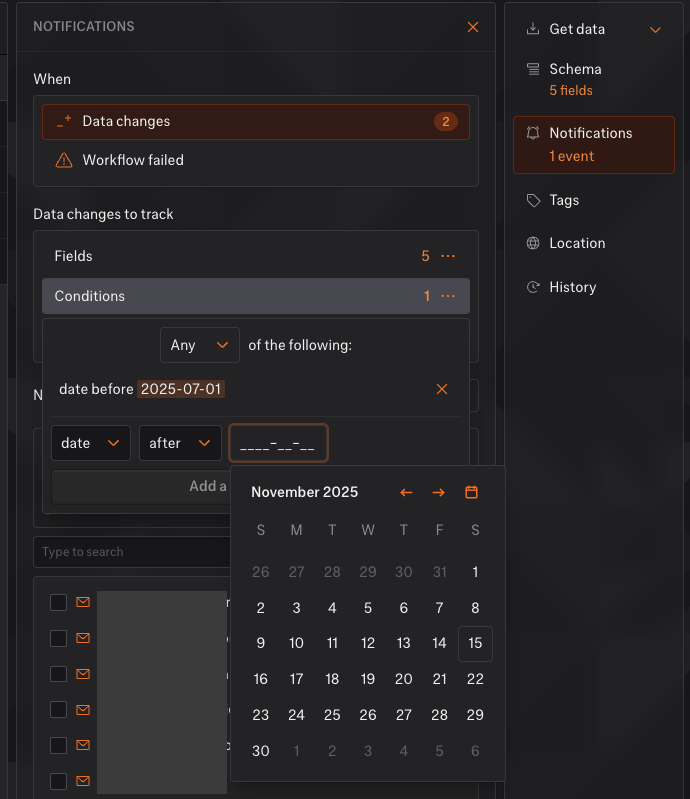
We've enhanced the notifications system with powerful date filtering capabilities. You can now add "before" and "after" date conditions to your notification rules, giving you more precise control over when notifications are triggered.
Date-Based Condition Filters
Configure date conditions to filter when notifications are sent based on specific date ranges. This is particularly useful for monitoring workflows where you need to track data changes within specific time periods.
How It Works
When setting up notification conditions for data changes, you can now:
- Add "before" date conditions - Trigger notifications only when data changes occur before a specific date
- Add "after" date conditions - Trigger notifications only when data changes occur after a specific date
- Combine multiple conditions - Use "Any" or "All" logic to combine date filters with other field conditions
This feature works for both real-time monitoring and normal monitoring workflows, allowing you to create sophisticated notification rules that match your specific use cases.
Use Cases
- Monitor data changes within a specific date range
- Set up notifications for upcoming deadlines or expiration dates
- Track changes that occurred before or after a specific event
- Combine date filters with field conditions for granular control
Learn More
Check out our Notifications documentation for detailed information about configuring date filters and other notification conditions.