



The Best AI Web Scrapers of 2026: An Honest Review
 Tavis Lochhead,Co-Founder of Kadoa
If you've managed a web scraping pipeline in the last few years, you know the "maintenance hell" cycle – you write a script, it works for 2 weeks, the target site changes a CSS class name, and your pipeline breaks at 2:00 AM.
In 2026, the best AI scrapers don't just write scripts for you; they fix them when they break. We're moving from brittle scripts to autonomous agents that rely on visual and semantic understanding rather than rigid selectors. This guide evaluates which AI web scraping tools actually solve the maintenance problem versus those that automate the script-writing process.
What is an AI web scraper? (And what it is not)
An AI web scraper relies on Large Language Models (LLMs) and multimodal analysis (text + vision) to identify data by its meaning, rather than its rigid HTML structure.
-
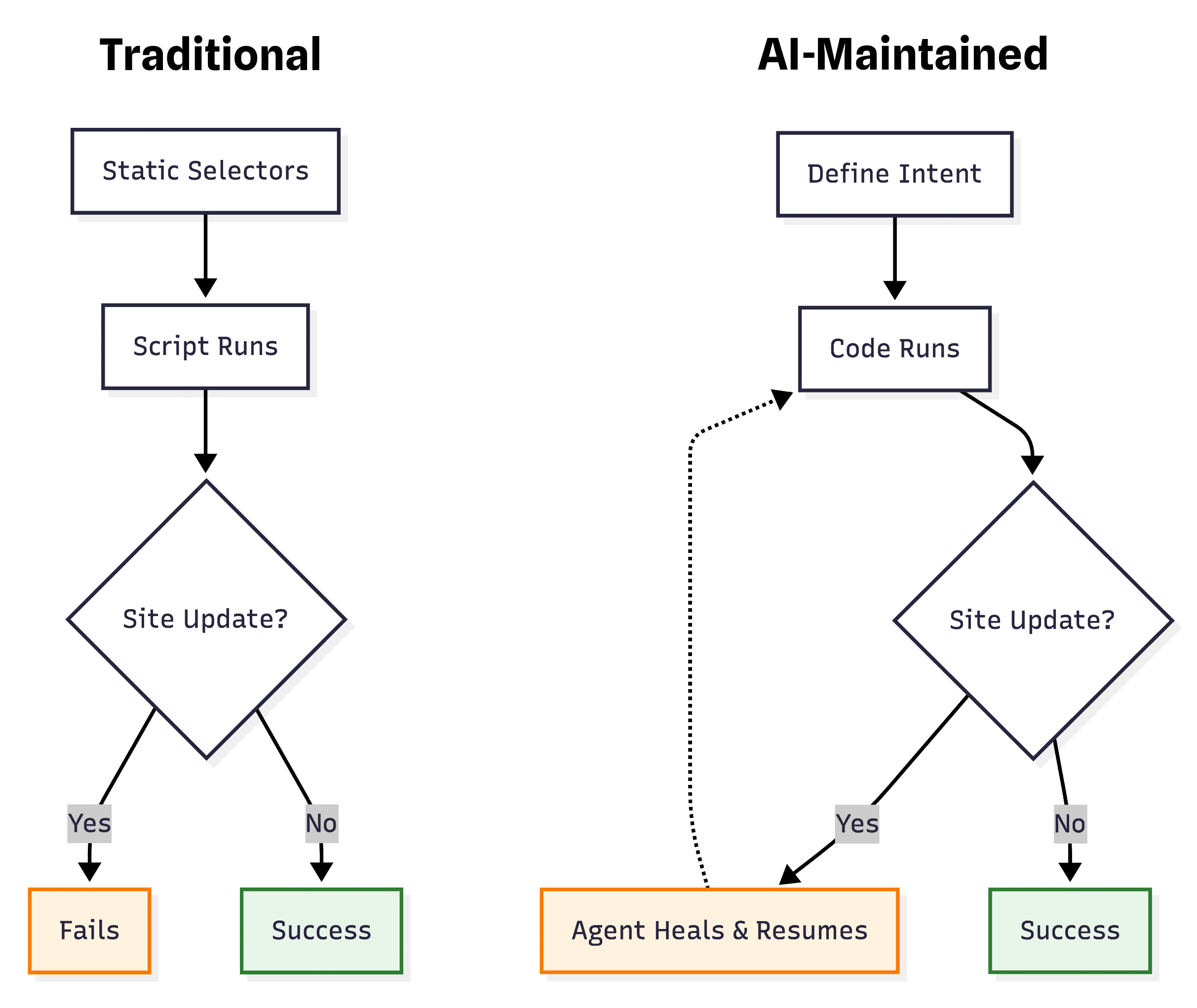
What it is – at its most advanced, it is a system where AI agents generate and continuously maintain deterministic scraping code. You define the intent (e.g., "Extract prices"), and the agent builds a robust extractor. It runs efficiently like a standard script but has the intelligence to self-heal by updating its own code if the website layout changes.
-
What it is not – a simple wrapper around ChatGPT that just generates brittle code and leaves you to fix it. Nor is it a slow "browser agent" that blindly tries to figure out the page from scratch on every single scrape. It's not real-time prompt engineering – real AI scrapers compile agent findings into efficient, deterministic extractors.
If the tool doesn't continuously monitor and repair broken selectors, it's not solving the core problem.
How we evaluated the best AI web scrapers
We tested each tool on real-world scenarios: dynamic e-commerce sites, anti-bot protections, pagination, and layout changes. The key evaluation criteria:
- Autonomous maintenance – Does it detect and fix broken extractors automatically?
- Multimodal intelligence – Does it use vision + text understanding, or just basic DOM parsing?
- Deterministic execution – Does it compile findings into efficient code, or re-prompt on every scrape?
- Enterprise readiness – Scheduling, monitoring, integrations, and support for large-scale workflows?
- Ease of use – No-code interface or developer-first API?

The Top AI Web Scrapers of 2026
1. Kadoa – Best fully autonomous AI scraper
Key Features:
- Zero-maintenance AI agents that continuously monitor and self-heal extractors
- Multimodal analysis (vision + text) for semantic data extraction
- Deterministic execution – compiles agent findings into efficient, production-ready code
- Enterprise workflow automation with scheduling, monitoring, and alerting
- Scales to millions of pages with intelligent batching and anti-bot bypass
Why it ranks #1:
The core design of Kadoa is "zero-maintenance". When you build a workflow, you define what the data is (e.g., "The product price"), not where the data is (e.g., nth-child(3)).

Our models view the rendered page like a human user. If Amazon moves the price from the sidebar to the center column, Kadoa identifies it by context and extracts it. We included a validation layer that compares previous run data with current data – if the layout shifts, the agents adapt automatically.
Best for: Enterprises and teams that need production-grade, autonomous scraping at scale. If you're tired of maintaining scripts, Kadoa eliminates that entirely.
Pricing: Free tier available. Paid plans start at $99/month with usage-based credits for large-scale extraction.
2. Browse AI – Best no-code visual scraper
Key Features:
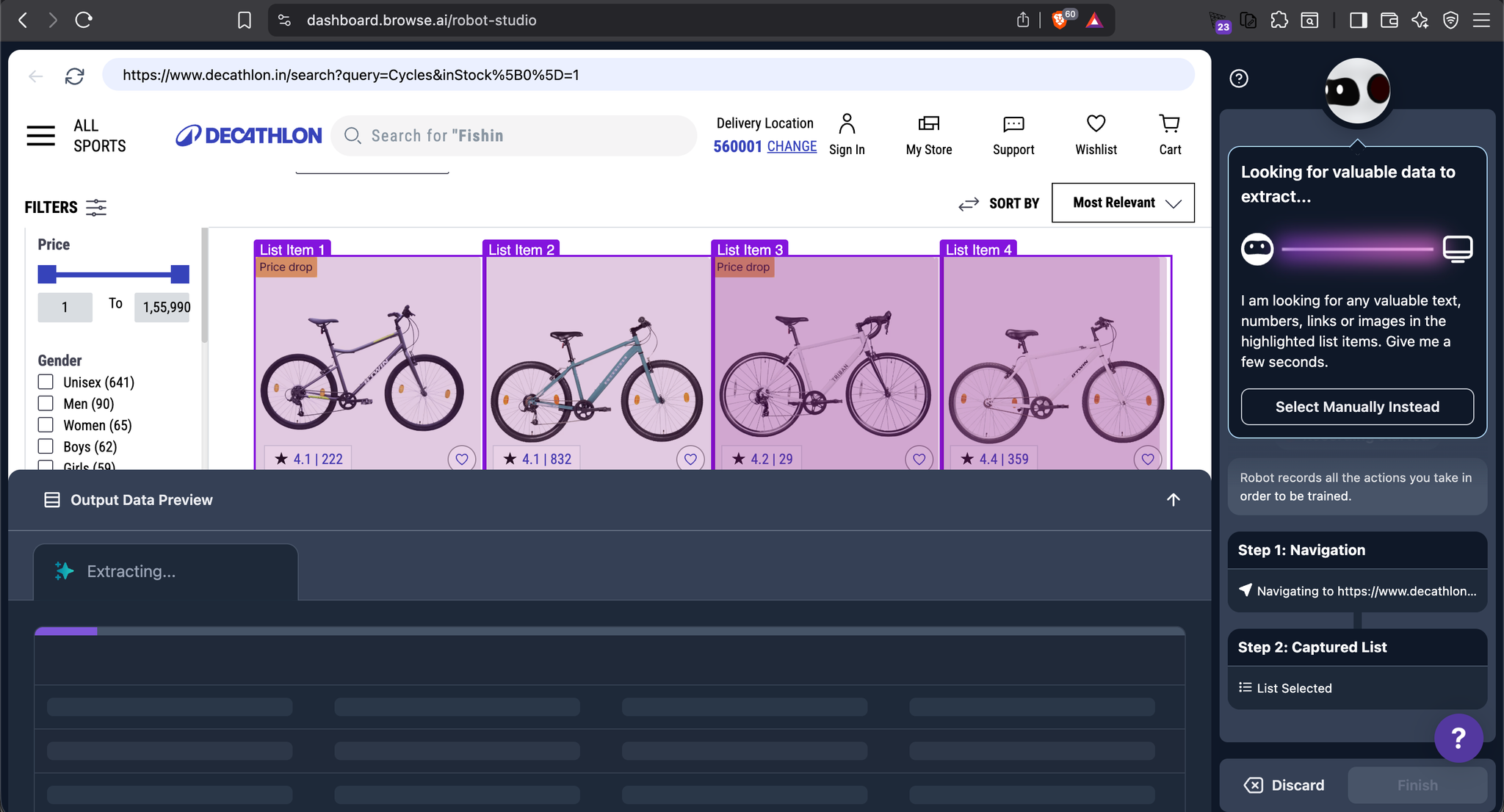
- Point-and-click visual interface for training robots
- Pre-built templates for common sites (LinkedIn, Amazon, etc.)
- Basic monitoring and change detection
- Cloud-based execution with scheduling
Why it's #2:
Browse AI pioneered the visual "robot training" approach. You click on elements you want to extract, and it generates the scraper. It's incredibly intuitive for non-technical users.
However, it relies heavily on traditional selectors under the hood. When sites change, you often need to retrain the robot manually. It doesn't have the autonomous selector generation that Kadoa provides.
Best for: Small teams and individuals who need a no-code solution and are comfortable with occasional manual retraining.
Pricing: Free tier with limited robots. Paid plans start at $49/month.
3. Firecrawl – Best developer-first API tool
Key Features:
- API-first design for developers
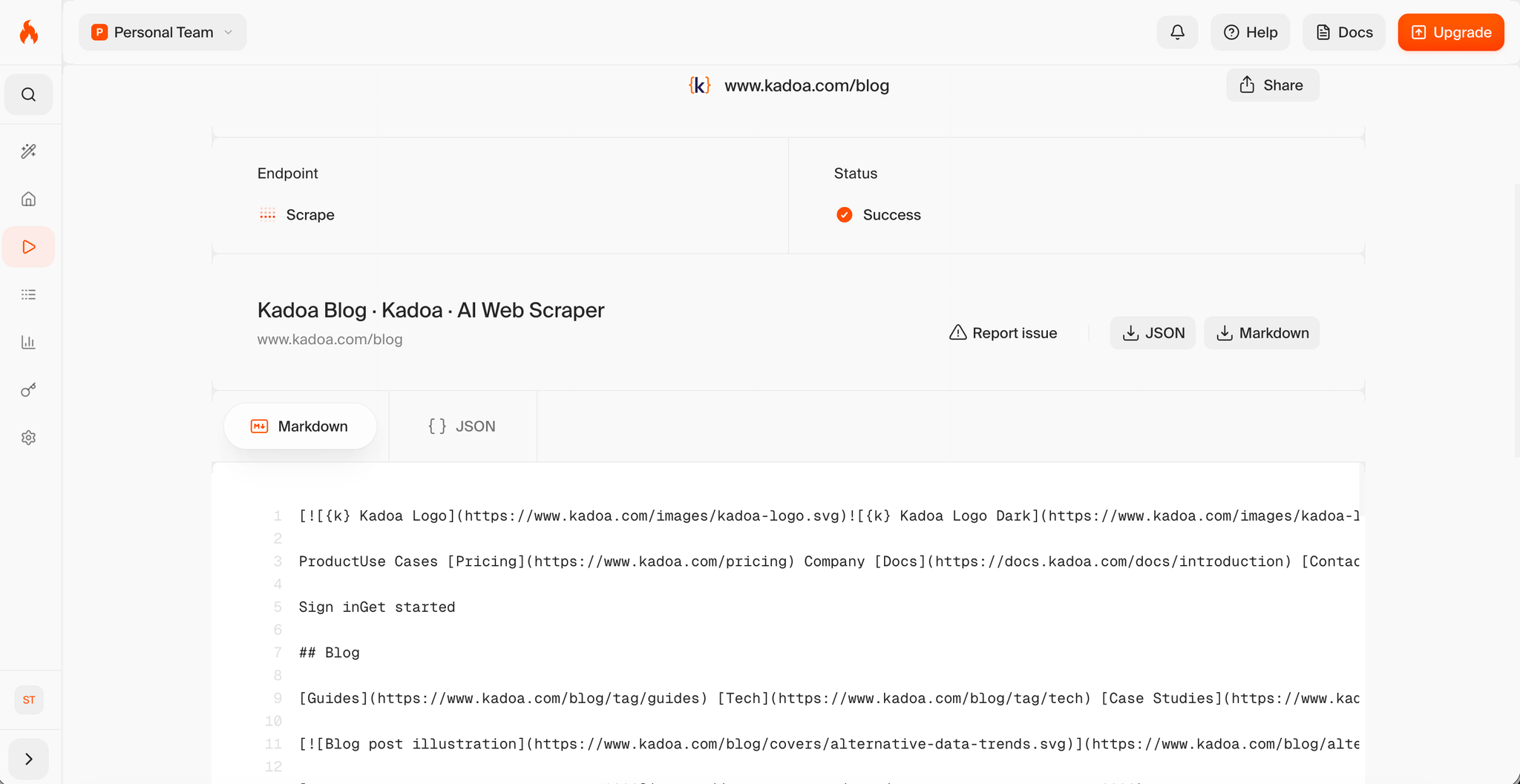
- Converts web pages to clean Markdown formatted for LLM ingestion
- Built-in JavaScript rendering and anti-bot bypass
- Webhook support for asynchronous scraping
Why it's #3:
Firecrawl is purpose-built for developers building AI applications. If you're feeding scraped data into an LLM pipeline (RAG, fine-tuning, etc.), Firecrawl's Markdown output is ideal.
It doesn't provide autonomous maintenance or self-healing – you're responsible for handling layout changes. But for one-off or low-maintenance scraping tasks, it's fast and reliable.
Best for: Developers building AI-powered applications who need clean, LLM-ready data.
Pricing: Pay-as-you-go with free credits. Starts at $0.001 per page.
4. Octoparse – Best hybrid (AI + traditional)
Key Features:
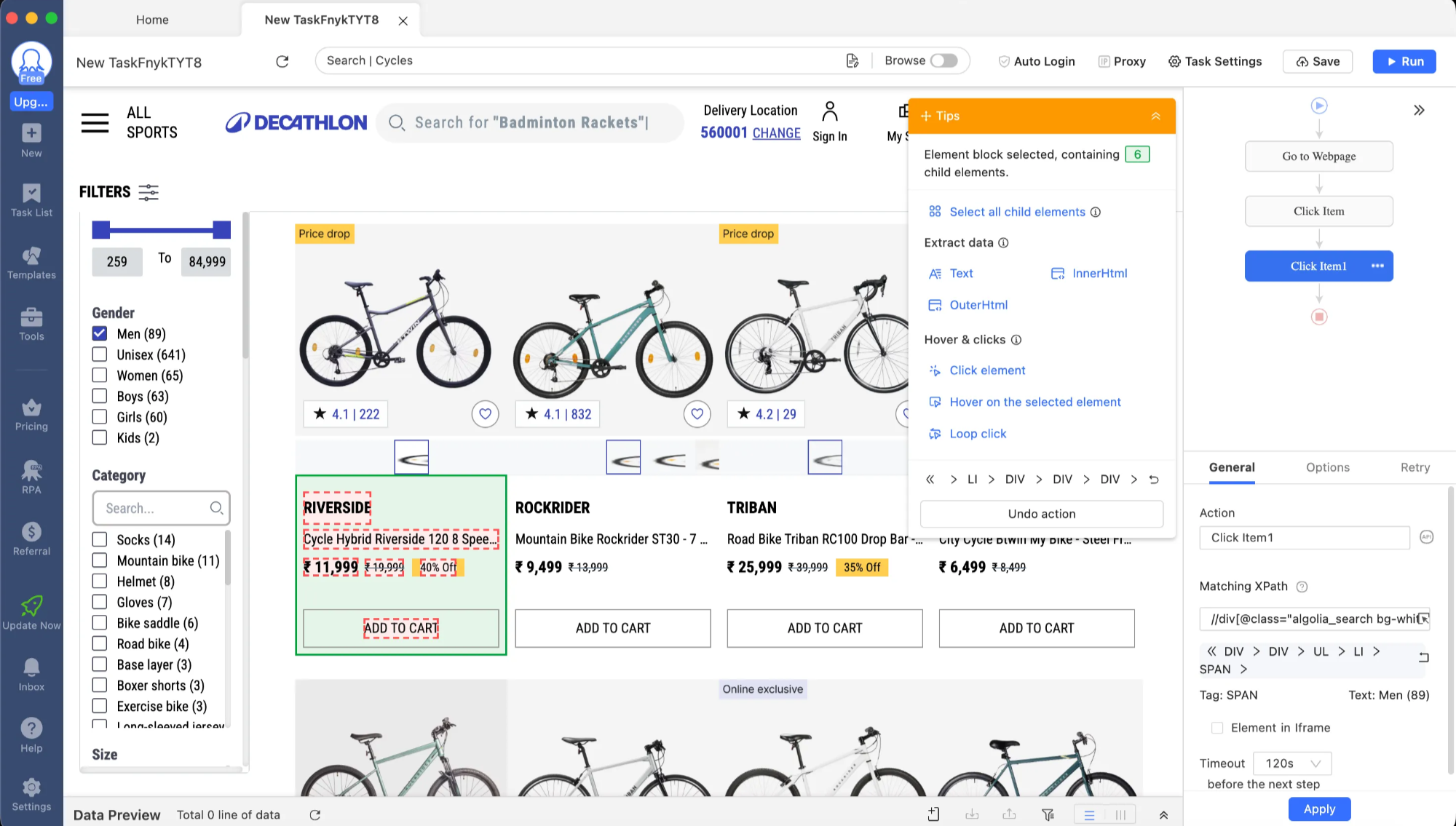
- Desktop and cloud-based scraping
- AI-assisted template generation
- Advanced workflow editor with XPath and regex support
- IP rotation and CAPTCHA solving
Why it's #4:
Octoparse has been around for years as a traditional scraper, but they've added AI features for template suggestions and intelligent pagination detection. It's powerful but has a steeper learning curve.
The AI features are helpful but not autonomous – you still need to configure selectors manually for complex sites.
Best for: Power users who want a balance of AI assistance and manual control.
Pricing: Free tier available. Paid plans start at $75/month.
5. Thunderbit – Best browser extension
Key Features:
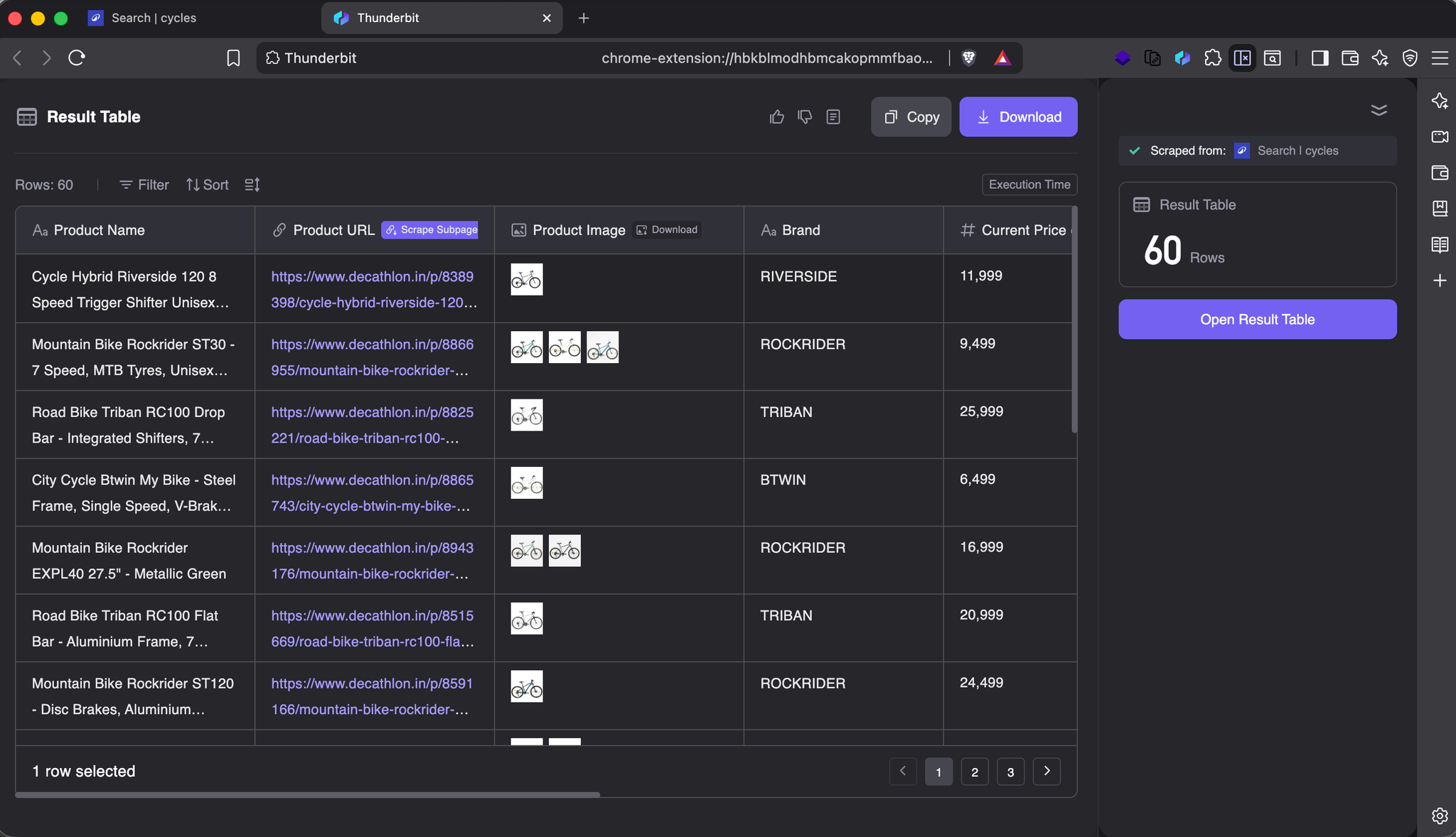
- Chrome extension for in-browser scraping
- AI-powered element detection
- Export to Google Sheets, Notion, or CSV
- No installation required
Why it's #5:
Thunderbit is perfect for quick, one-off data extraction directly in your browser. You highlight what you want, and it extracts it. Great for ad-hoc research.
But it's not designed for production workflows or ongoing monitoring. No scheduling, no autonomous maintenance.
Best for: Researchers and analysts who need quick data extraction for personal use.
Pricing: Free tier available. Paid plans start at $20/month.
Comparison Table
Tool | Autonomous Maintenance | Multimodal AI | Deterministic Code | Enterprise Ready | Ease of Use | |||||||||||||||||||||||||||||||||||||||||||||||||||||||||||||||||||||||||||||||||||||||||||||||||||||||||||||||||||||||||||||||||||||||||||||||||||||||||||||||||||||||||||||||||||||||||||||||||||||||||||||||||||||||||||||||||||||||||||||||||||||||||||||||||||||||||||||||||||||||||||||||||||||||||||||||||||||||||||||||||||||||||||||||||||||||||||||||||||||||||||||||||||||||||||||||||||||||||||||||||||||||||||||||||||||||||||||||||||||||||||||||||||||||||||||||||||||||||||||||||||||||||||||||||||||||||||||||||||||||||||||||||||||||||||||||||||||||||||||||||||||||||||||||||||||||||||||||||||||||||||||||||||||||||||||||||||||||||||||||||||||||||||||||||||||||||||||||||||||||||||||||||||||||||||||||||||||||||||||||||||||||||||||||||||||||||||||||||||||||||||||||||||||||||||||||||||||||||||||||||||||||||||||||||||||||||||||||||||||||||||||||||||||||||||||||||||||||||||||||||||||||||||||||||||||||||||||||||||||||||||||||||||||||||||||||||||||||||||||||||||||||||||||||||||||||||||||||||
Tool | Autonomous Maintenance | Multimodal AI | Deterministic Code | Enterprise Ready | Ease of Use | |||||||||||||||||||||||||||||||||||||||||||||||||||||||||||||||||||||||||||||||||||||||||||||||||||||||||||||||||||||||||||||||||||||||||||||||||||||||||||||||||||||||||||||||||||||||||||||||||||||||||||||||||||||||||||||||||||||||||||||||||||||||||||||||||||||||||||||||||||||||||||||||||||||||||||||||||||||||||||||||||||||||||||||||||||||||||||||||||||||||||||||||||||||||||||||||||||||||||||||||||||||||||||||||||||||||||||||||||||||||||||||||||||||||||||||||||||||||||||||||||||||||||||||||||||||||||||||||||||||||||||||||||||||||||||||||||||||||||||||||||||||||||||||||||||||||||||||||||||||||||||||||||||||||||||||||||||||||||||||||||||||||||||||||||||||||||||||||||||||||||||||||||||||||||||||||||||||||||||||||||||||||||||||||||||||||||||||||||||||||||||||||||||||||||||||||||||||||||||||||||||||||||||||||||||||||||||||||||||||||||||||||||||||||||||||||||||||||||||||||||||||||||||||||||||||||||||||||||||||||||||||||||||||||||||||||||||||||||||||||||||||||||||||||||||||||||||||||||
Tool | Autonomous Maintenance | Multimodal AI | Deterministic Code | Enterprise Ready | Ease of Use | |||||||||||||||||||||||||||||||||||||||||||||||||||||||||||||||||||||||||||||||||||||||||||||||||||||||||||||||||||||||||||||||||||||||||||||||||||||||||||||||||||||||||||||||||||||||||||||||||||||||||||||||||||||||||||||||||||||||||||||||||||||||||||||||||||||||||||||||||||||||||||||||||||||||||||||||||||||||||||||||||||||||||||||||||||||||||||||||||||||||||||||||||||||||||||||||||||||||||||||||||||||||||||||||||||||||||||||||||||||||||||||||||||||||||||||||||||||||||||||||||||||||||||||||||||||||||||||||||||||||||||||||||||||||||||||||||||||||||||||||||||||||||||||||||||||||||||||||||||||||||||||||||||||||||||||||||||||||||||||||||||||||||||||||||||||||||||||||||||||||||||||||||||||||||||||||||||||||||||||||||||||||||||||||||||||||||||||||||||||||||||||||||||||||||||||||||||||||||||||||||||||||||||||||||||||||||||||||||||||||||||||||||||||||||||||||||||||||||||||||||||||||||||||||||||||||||||||||||||||||||||||||||||||||||||||||||||||||||||||||||||||||||||||||||||||||||||||||||
Tool | Autonomous Maintenance | Multimodal AI | Deterministic Code | Enterprise Ready | Ease of Use | |||||||||||||||||||||||||||||||||||||||||||||||||||||||||||||||||||||||||||||||||||||||||||||||||||||||||||||||||||||||||||||||||||||||||||||||||||||||||||||||||||||||||||||||||||||||||||||||||||||||||||||||||||||||||||||||||||||||||||||||||||||||||||||||||||||||||||||||||||||||||||||||||||||||||||||||||||||||||||||||||||||||||||||||||||||||||||||||||||||||||||||||||||||||||||||||||||||||||||||||||||||||||||||||||||||||||||||||||||||||||||||||||||||||||||||||||||||||||||||||||||||||||||||||||||||||||||||||||||||||||||||||||||||||||||||||||||||||||||||||||||||||||||||||||||||||||||||||||||||||||||||||||||||||||||||||||||||||||||||||||||||||||||||||||||||||||||||||||||||||||||||||||||||||||||||||||||||||||||||||||||||||||||||||||||||||||||||||||||||||||||||||||||||||||||||||||||||||||||||||||||||||||||||||||||||||||||||||||||||||||||||||||||||||||||||||||||||||||||||||||||||||||||||||||||||||||||||||||||||||||||||||||||||||||||||||||||||||||||||||||||||||||||||||||||||||||||||||||
Tool | Autonomous Maintenance | Multimodal AI | Deterministic Code | Enterprise Ready | Ease of Use | |||||||||||||||||||||||||||||||||||||||||||||||||||||||||||||||||||||||||||||||||||||||||||||||||||||||||||||||||||||||||||||||||||||||||||||||||||||||||||||||||||||||||||||||||||||||||||||||||||||||||||||||||||||||||||||||||||||||||||||||||||||||||||||||||||||||||||||||||||||||||||||||||||||||||||||||||||||||||||||||||||||||||||||||||||||||||||||||||||||||||||||||||||||||||||||||||||||||||||||||||||||||||||||||||||||||||||||||||||||||||||||||||||||||||||||||||||||||||||||||||||||||||||||||||||||||||||||||||||||||||||||||||||||||||||||||||||||||||||||||||||||||||||||||||||||||||||||||||||||||||||||||||||||||||||||||||||||||||||||||||||||||||||||||||||||||||||||||||||||||||||||||||||||||||||||||||||||||||||||||||||||||||||||||||||||||||||||||||||||||||||||||||||||||||||||||||||||||||||||||||||||||||||||||||||||||||||||||||||||||||||||||||||||||||||||||||||||||||||||||||||||||||||||||||||||||||||||||||||||||||||||||||||||||||||||||||||||||||||||||||||||||||||||||||||||||||||||||||
When to use each tool
-
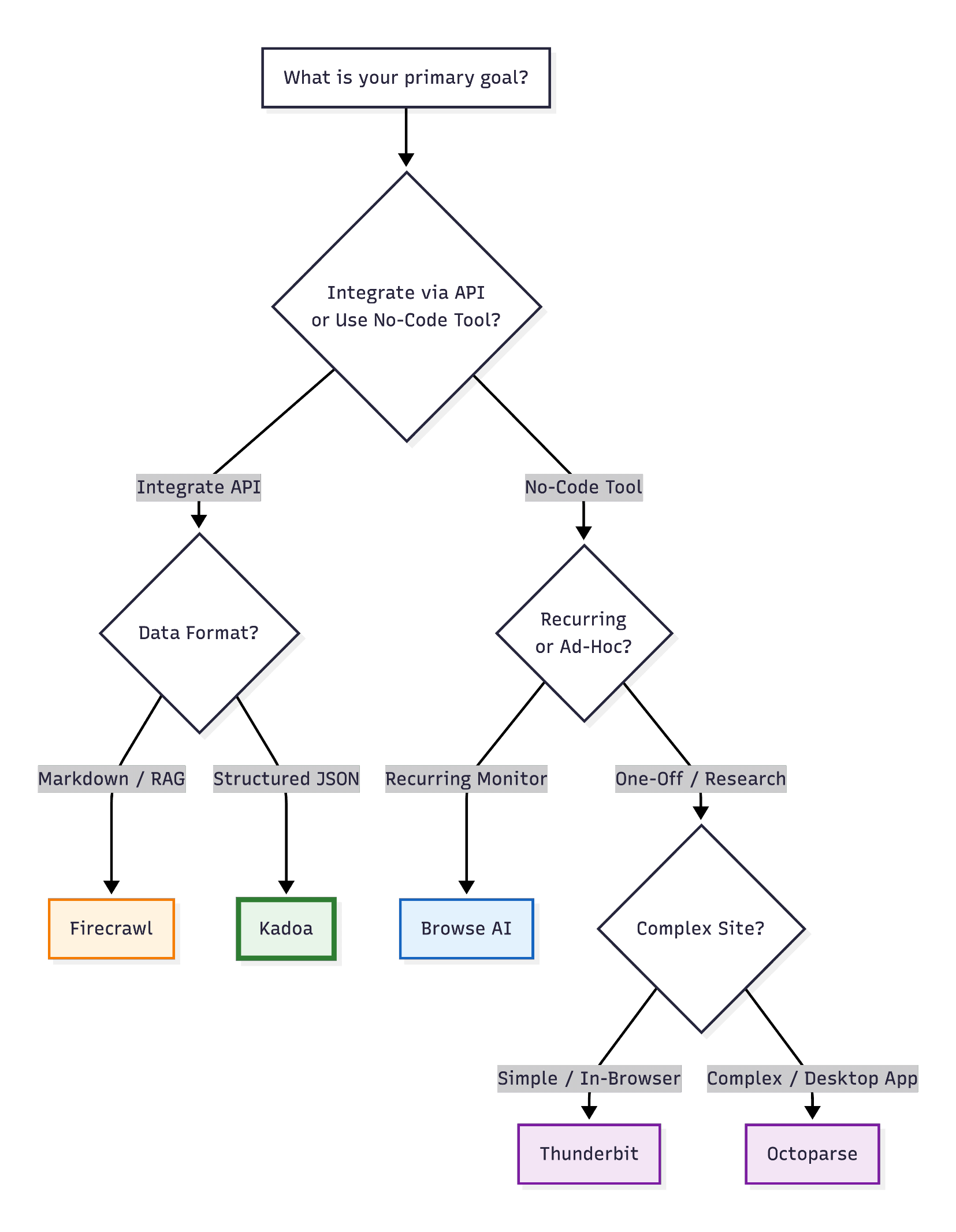
Use Kadoa if you need production-grade, autonomous scraping that requires zero maintenance. Perfect for enterprise workflows, alternative data collection, and large-scale monitoring.
-
Use Browse AI if you're a non-technical user who needs a simple, visual interface and doesn't mind occasional manual retraining.
-
Use Firecrawl if you're a developer building AI applications and need clean, LLM-ready Markdown output.
-
Use Octoparse if you need advanced control and are comfortable with XPath/regex configuration.
-
Use Thunderbit if you need quick, one-off extractions directly in your browser.
The future of AI web scraping
The web scraping industry is shifting from "build and maintain scripts" to "manage autonomous agents." The tools that win will be those that:
- Self-heal automatically – No more 2 AM alerts for broken selectors
- Understand context, not structure – Extract data by meaning, not by CSS class names
- Compile to deterministic code – Run efficiently, not as slow browser automation
- Integrate into workflows – Native support for scheduling, monitoring, and data pipelines
Kadoa is leading this shift. If you want to experience truly autonomous web scraping, start a workflow today.
Related Reading
- AI Agents: Hype vs. Reality
- Build vs. Buy: The Shift in Web Scraping
- 2026 Alternative Data Trends Report
Legal and compliance considerations
When using any web scraping tool, ensure you:
- Respect
robots.txtand website terms of service - Don't overload target servers with excessive requests
- Comply with data privacy regulations (GDPR, CCPA, etc.)
- Use scraped data ethically and legally
All reputable AI scrapers, including Kadoa, provide features to help you stay compliant: rate limiting, robots.txt respect, and transparent data handling.
Conclusion: From maintaining scripts to managing data
The shift from traditional web scraping to AI-powered extraction isn't just about convenience – it's about fundamentally changing the maintenance burden.
In the old model, you spent 20% of your time building the scraper and 80% maintaining it. With AI scrapers like Kadoa, you spend 5% setting up the workflow and 95% using the data.
The question is no longer "Can I scrape this site?" but rather "What will I do with the data once I have it?"
That's the real promise of AI web scraping in 2026.
About the Author:
Tavis Lochhead is a co-founder at Kadoa, where he leads product development for autonomous web scraping infrastructure. With a background in machine learning and large-scale data systems, he's passionate about eliminating the maintenance burden of traditional web scraping.

Related Articles
How AI Is Changing Web Scraping in 2026
Explore how AI is changing web scraping in 2026. From automation and data quality to compliance to scalability and real-world use cases.
How to build a global mining production dataset from scratch
How we used LLM-generated, deterministic ETL pipelines to build a source-backed global mining production dataset from public company reports.

What is Web Scraping? Enterprise Use Cases for 2026
A comprehensive enterprise guide to web scraping in 2026. How to run it at scale, where AI helps, how to stop losing engineering hours to maintenance, and what separates platforms worth evaluating.